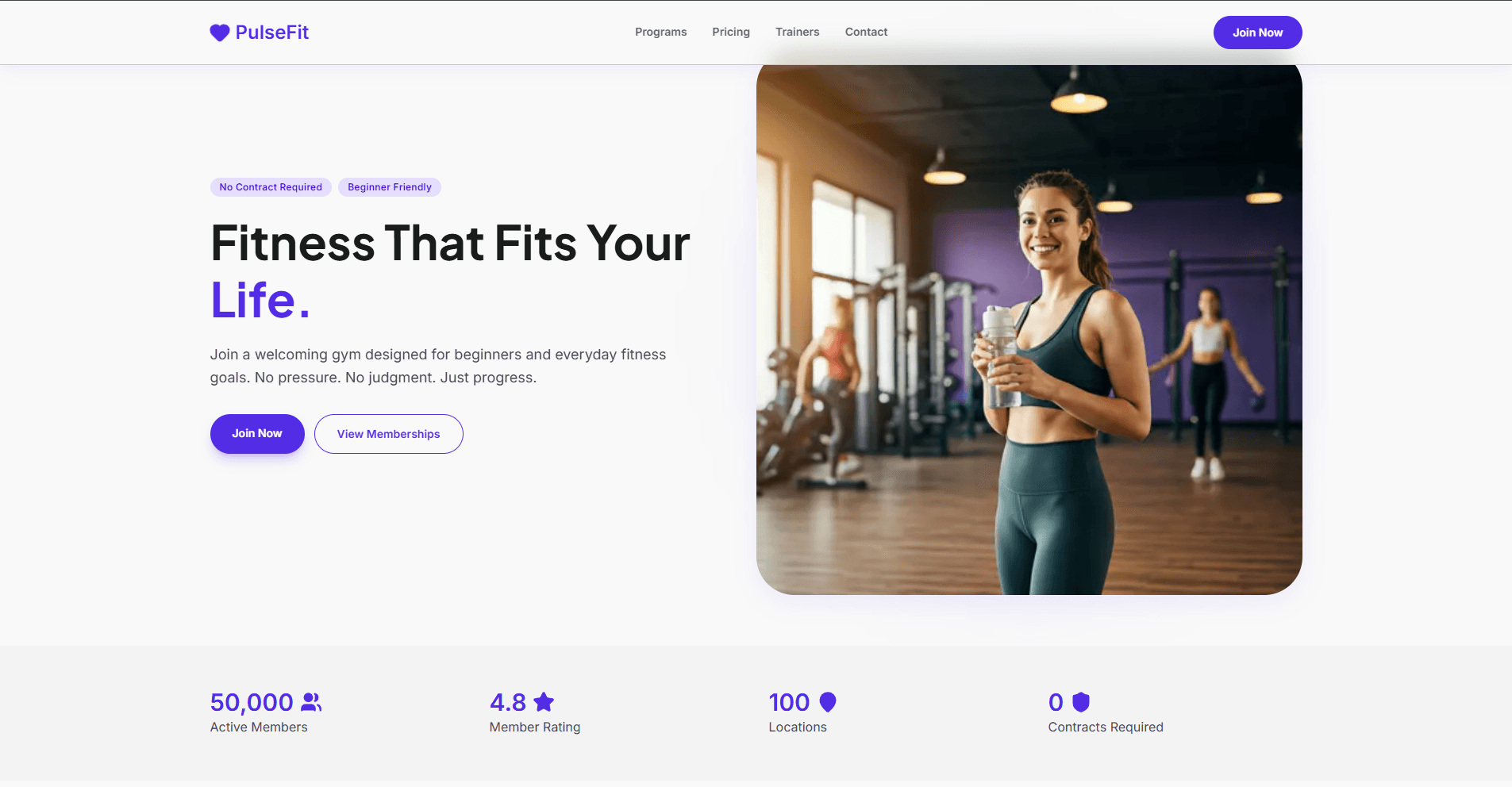
Pulse Fit
A modern fitness website built with Next.js, React, and TypeScript. The site showcases gym programs, pricing, trainers, and services with smooth animations and optimized performance.
Table of Contents
Features
- Server-Side Rendering: Optimized Next.js configuration for fast page loads and SEO
- Smooth Animations: Fade-in effects and motion components for visual polish
- Responsive Design: Tailwind CSS for mobile-first responsive layouts
- TypeScript: Full type safety throughout the codebase
- Performance Optimized: Code splitting with dynamic imports, image optimization
- Component Architecture: Reusable modular components for easy maintenance
Tech Stack
- Framework: Next.js 16 with React 19
- Language: TypeScript
- Styling: Tailwind CSS 4
- Animations: Motion for smooth transitions
- Icons: Lucide React
- PostCSS: CSS processing and transformation
- Linting: ESLint with Next.js config
Getting Started
Prerequisites
Ensure you have the following installed:
- Node.js 18.17 or later
- npm or yarn package manager
Installation
- Clone the repository:
git clone <repository-url>
cd pulse-fit
- Install dependencies:
npm install
Running the Development Server
Start the development server:
npm run dev
Open http://localhost:3000 in your browser to view the site.
The page auto-updates as you edit files. The application uses hot module replacement (HMR) for instant feedback during development.
Building for Production
Create an optimized production build:
npm run build
npm start
The build process compiles TypeScript, optimizes components, and prepares assets for deployment.
Project Structure
pulse-fit/
├── app/                          # Next.js app directory
│   ├── layout.tsx               # Root layout with navbar and footer
│   ├── page.tsx                 # Homepage with main sections
│   └── globals.css              # Global styles
├── components/
│   ├── FadeIn.tsx              # Fade-in animation wrapper
│   ├── PageIntro.tsx           # Intro section wrapper
│   ├── layouts/
│   │   ├── Navbar.tsx          # Navigation header
│   │   └── Footer.tsx          # Site footer
│   └── sections/               # Homepage sections
│       ├── Hero.tsx            # Hero banner
│       ├── Stats.tsx           # Statistics display
│       ├── Whyus.tsx           # Features/benefits section
│       ├── Programs.tsx        # Workout programs
│       ├── Pricing.tsx         # Pricing tiers
│       ├── Trainers.tsx        # Team trainers
│       ├── AppSection.tsx      # App promotion section
│       └── CTA.tsx             # Call-to-action
├── data/                        # Static data files
│   ├── hero.ts
│   ├── stats.ts
│   ├── programs.ts
│   ├── pricing.ts
│   ├── trainers.ts
│   ├── features.ts
│   ├── nav.ts
│   └── footer.ts
├── public/                      # Static assets
├── next.config.ts              # Next.js configuration
├── tailwind.config.mjs          # Tailwind CSS configuration
├── tsconfig.json               # TypeScript configuration
└── package.json                # Project dependencies
Configuration
Environment Variables
Create a .env.local file in the root directory for local environment variables (if needed):
# Example - add your variables here
Next.js Configuration
The next.config.ts file includes configuration for remote image optimization from:
lh3.googleusercontent.com(Google CDN)images.unsplash.com(Unsplash)
To add more image sources, update the remotePatterns array in next.config.ts.
Tailwind CSS
Tailwind CSS 4 is configured with PostCSS. Customize your design system in tailwind.config.mjs:
export default {
  theme: {
    extend: {
      colors: {
        // Add custom colors
      },
    },
  },
};
Data Management
Static content is managed through TypeScript files in the data/ directory. Each file exports typed data:
// Example: data/programs.ts
export const programs = [
  {
    id: 1,
    title: "Program Name",
    description: "Program details",
  },
];
Development
Available Scripts
npm run dev- Start development server with hot reloadnpm run build- Build for productionnpm start- Start production server (requiresnpm run buildfirst)npm run lint- Run ESLint to check code quality
Creating Components
New components should follow the existing patterns:
- Functional Components: Use arrow functions with TypeScript types
- Client Components: Add
"use client"directive for interactive features - Styling: Use Tailwind CSS utility classes
- Animations: Use Motion hooks for animations (see
FadeIn.tsxfor reference)
Example component:
"use client";

import { ComponentProps } from "react";

interface MyComponentProps {
  title: string;
  description: string;
}

export function MyComponent({ title, description }: MyComponentProps) {
  return (
    <div className="p-4">
      <h2 className="text-2xl font-bold">{title}</h2>
      <p className="text-gray-600">{description}</p>
    </div>
  );
}
Styling Guidelines
- Use Tailwind CSS utility classes
- Keep component styles within the component file
- Use the configured fonts:
Plus Jakarta Sans(primary) andInter(secondary) - Follow mobile-first responsive design approach
Code Quality
Run the linter to check for code issues:
npm run lint
The project uses ESLint with Next.js recommended rules. Fix issues automatically when possible:
npm run lint -- --fix
Contributing
Contributions are welcome. To contribute:
- Fork the repository
- Create a feature branch (
git checkout -b feature/amazing-feature) - Commit your changes (
git commit -m 'Add amazing feature') - Push to the branch (
git push origin feature/amazing-feature) - Open a Pull Request
Please ensure:
- Code follows the project's ESLint rules
- Components are properly typed with TypeScript
- Styles use Tailwind CSS utilities
- Changes are tested in the development server
License
This project is licensed under the MIT License - see the LICENSE file for details.
Support
For issues, questions, or suggestions, please open an issue in the repository or contact the maintainers.