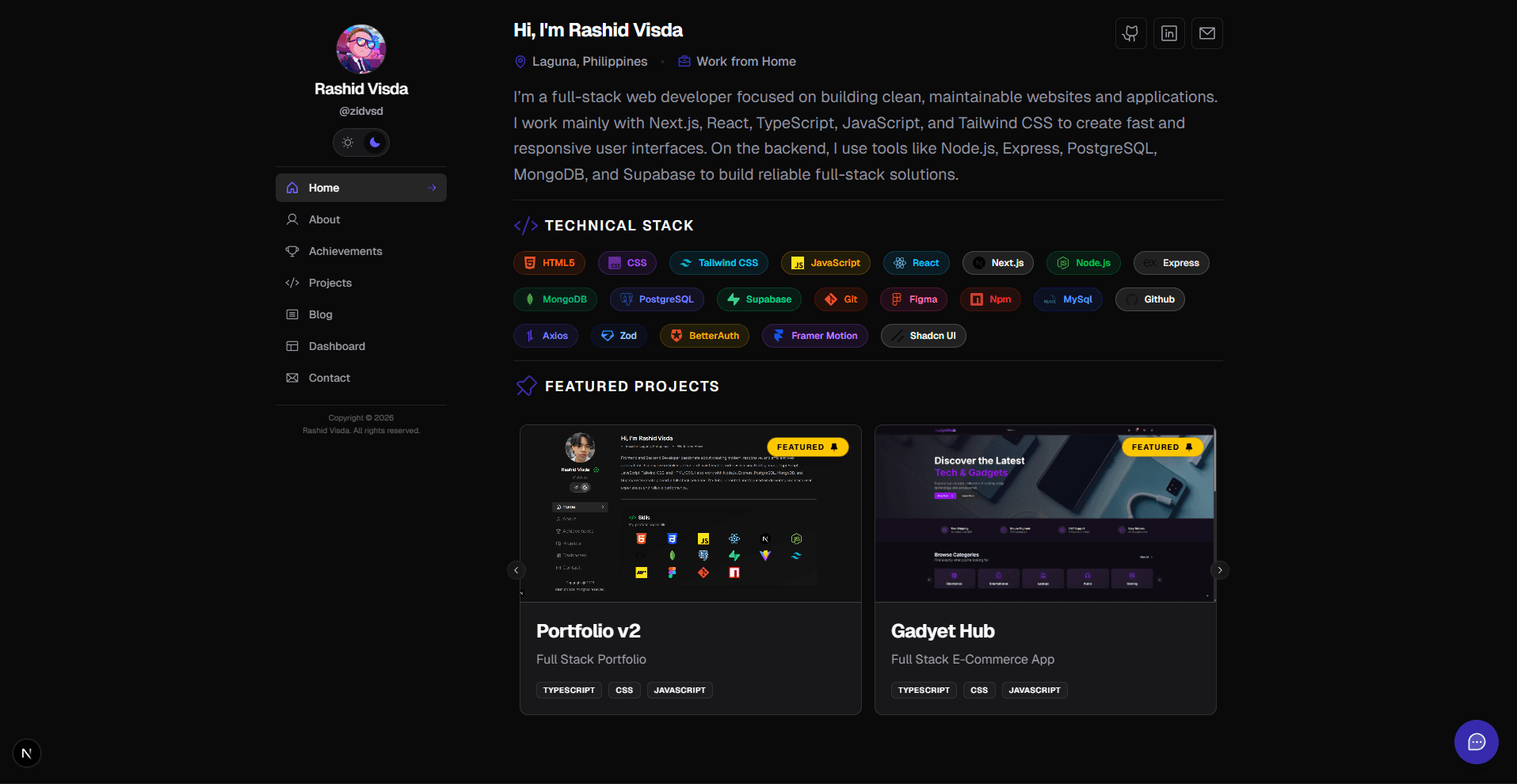
Portfolio v2




A modern, feature-rich developer portfolio built with Next.js 16, React 19, and TypeScript. Showcase your projects, write about your journey, and connect real-time integrations with GitHub, Spotify, Codewars, WakaTime, and more—all powered by AI chat and a beautiful, responsive design.
Live demo: https://zidvsd.site/
Table of Contents
- What You Get
- Quick Start
- Configuration
- Project Structure
- Core Features & Integrations
- Admin Dashboard
- Customization
- API Routes
- Database
- Development
- Troubleshooting
- Contributing
- License
What You Get
Feature Highlights
Real-time Integrations — GitHub, Spotify, Codewars, WakaTime
AI Chat Assistant — Google Gemini-powered visitor interactions
Blog System — Markdown support with admin dashboard
Comments — Global and blog-specific comment threads
Authentication — Better Auth with session management
Dark/Light Theme — Seamless theme switching
Mobile-First Design — Fully responsive and accessible
Email Integration — Contact form with Resend
Deployment Ready — Optimized for Vercel or any Node.js host
Modern Tech Stack
- Next.js 16 App Router with streaming and optimized performance
- React 19 Server & Client Components
- TypeScript for type safety across the codebase
- Tailwind CSS + shadcn/ui for beautiful, accessible components
- Mongoose + MongoDB for reliable data persistence
- ESLint + Prettier for consistent code quality
Real-time Data Integrations
- GitHub — Fetch repositories, contribution stats, and profile activity
- Spotify — Display currently playing tracks and personalized playlists
- Codewars — Showcase coding challenge progress and rankings
- WakaTime — Visualize coding activity breakdown by language
- Google Gemini — AI-powered chat assistant for visitor interactions
- Resend — Reliable email delivery for contact form submissions
Pre-built Portfolio Sections
- Projects — GitHub-synced projects with featured showcase and detail pages
- Blog — Markdown-powered blog with filtering, search, and admin dashboard
- Dashboard — Real-time stats and integrations widget gallery
- Achievements — Track milestones, certifications, and accomplishments
- Contact — Form with email validation and AI-assisted responses
- About — Personalized profile with skills, experience, and status
Polished User Experience
- Dark/Light theme support with persistent preference
- Mobile-first responsive design
- Smooth page transitions and animations with Framer Motion
- Skeleton loaders for perceived performance
- Toast notifications (Sonner)
- Image carousels with keyboard navigation (Embla)
Quick Start
Prerequisites
Before you begin, ensure you have:
- Node.js 18+ and npm/yarn/pnpm
- MongoDB Atlas account (free tier available) OR local MongoDB instance via Docker
- API keys for the integrations you want to use (optional for local development)
Installation
-
Clone and install
git clone https://github.com/yourusername/portfolio-v2.git cd portfolio-v2 npm install -
Set up environment variables
# Copy the template cp .env.example .env.local # Edit with your API keys -
Start the development server
npm run devOpen http://localhost:3000 in your browser. The app auto-reloads on file changes thanks to Turbopack.
Configuration
Environment Variables
Create a .env.local file in the project root. Here's a complete template:
# Database
MONGODB_URI=mongodb+srv://username:password@cluster.mongodb.net/portfolio

# GitHub (optional - for project fetching)
NEXT_PUBLIC_GITHUB_USERNAME=your-username
GITHUB_API_TOKEN=ghp_xxxxxxxxxxxxxxxxxxxx

# Spotify (optional - for music integration)
NEXT_PUBLIC_SPOTIFY_CLIENT_ID=your_client_id
SPOTIFY_CLIENT_SECRET=your_client_secret
SPOTIFY_REFRESH_TOKEN=your_refresh_token

# Google Gemini (optional - for AI chat)
GEMINI_API_KEY=your_gemini_api_key

# WakaTime (optional - for activity stats)
WAKATIME_API_KEY=your_wakatime_api_key

# Codewars (optional - for coding challenges)
CODEWARS_USERNAME=your_codewars_username

# Email (Resend - for contact form)
RESEND_API_KEY=your_resend_api_key

# App Configuration
NEXT_PUBLIC_APP_URL=http://localhost:3000
Getting API Keys
| Service | Link | Required? |
|---|---|---|
| GitHub | Create Personal Access Token | No |
| Spotify | Developer Dashboard | No |
| Google Gemini | Create API Key | No |
| WakaTime | Settings → API Key | No |
| Codewars | Public API | No |
| Resend | Get API Key | Only for contact form |
| MongoDB | Create Atlas Cluster | Yes |
Note: All integrations except MongoDB are optional. The portfolio works great with just MongoDB for local development.
Development & Build Commands
npm run dev          # Start dev server with Turbopack (instant HMR)
npm run build        # Build for production
npm start            # Run production server locally
npm run typecheck    # Full TypeScript type checking
npm run lint         # ESLint + Next.js lint check
npm run format       # Prettier code formatting
Project Structure
portfolio-v2/
├── app/                              # Next.js App Router (server-rendered)
│   ├── page.tsx                      # Home page with hero & projects
│   ├── layout.tsx                    # Root layout & providers
│   ├── globals.css                   # Global styles & CSS variables
│   ├── (auth)/                       # Auth group
│   │   ├── login/page.tsx
│   │   └── signup/page.tsx
│   ├── (admin)/                      # Protected admin routes
│   │   └── studio/
│   ├── about/page.tsx                # About section
│   ├── achievements/page.tsx         # Achievements showcase
│   ├── projects/                     # Projects section
│   │   ├── page.tsx
│   │   └── [projectId]/page.tsx
│   ├── blog/                         # Blog section
│   │   ├── page.tsx
│   │   └── [slug]/page.tsx
│   ├── dashboard/page.tsx            # Integrations dashboard
│   ├── contact/page.tsx              # Contact form
│   └── api/                          # API routes
│       ├── auth/route.ts
│       ├── chat/route.ts             # AI chat endpoint (Gemini)
│       ├── contact/route.ts          # Email submission (Resend)
│       └── blog/route.ts
│
├── components/                       # React components (UI & features)
│   ├── layout/
│   │   ├── MainLayout.tsx
│   │   ├── Sidebar.tsx
│   │   └── MobileMenuDrawer.tsx
│   ├── dashboard/                    # Integration cards
│   │   ├── GitHubCard.tsx
│   │   ├── SpotifyCard.tsx
│   │   ├── CodewarsCard.tsx
│   │   ├── WakaTimeCard.tsx
│   │   └── ...
│   ├── blog/
│   │   ├── BlogCard.tsx
│   │   ├── BlogList.tsx
│   │   ├── BlogSinglePage.tsx
│   │   └── BlogFilterBar.tsx
│   ├── forms/
│   │   ├── LoginForm.tsx
│   │   ├── SignUpForm.tsx
│   │   ├── ContactForm.tsx
│   │   └── BlogForm.tsx
│   ├── ui/                           # shadcn/ui & custom components
│   ├── themes/                       # Theme provider
│   ├── motion/                       # Animation wrappers
│   │   ├── MotionWrapper.tsx
│   │   ├── StaggerWrapper.tsx
│   │   └── InView.tsx
│   ├── skeleton/                     # Loading skeletons
│   └── sections/
│       ├── home/
│       ├── blog/
│       ├── projects/
│       └── achievements/
│
├── lib/                              # Utilities & configuration
│   ├── services/                     # External API integrations
│   │   ├── github.ts                 # GitHub API
│   │   ├── spotify.ts                # Spotify API
│   │   ├── codewars.ts               # Codewars API
│   │   ├── wakatime.ts               # WakaTime API
│   │   ├── resend.ts                 # Email service
│   │   ├── queries.ts                # Database queries
│   │   └── gemini.ts                 # Google Gemini AI
│   ├── constants/
│   │   ├── projects-config.ts        # Featured projects
│   │   └── tech-data.ts              # Technology metadata
│   ├── types/                        # TypeScript definitions
│   │   └── index.ts
│   ├── schemas/                      # Zod validation schemas
│   ├── db.ts                         # MongoDB connection
│   ├── auth.ts                       # Authentication setup (Better Auth)
│   ├── utils.ts                      # Utility functions
│   └── markdown-parser.ts            # Markdown → HTML conversion
│
├── models/                           # Mongoose schemas
│   ├── Profile.ts                    # User profile
│   ├── Blogs.ts                      # Blog posts
│   ├── Achievements.ts               # Achievements
│   └── Experiences.ts                # Work experience
│
├── hooks/                            # Custom React hooks
│   └── useBlogFilters.ts
│
├── public/                           # Static assets
│   ├── images/
│   ├── icons/
│   └── ...
│
├── package.json
├── tsconfig.json
├── next.config.mjs
├── tailwind.config.ts
└── postcss.config.mjs
Core Features & Integrations
Authentication
This portfolio uses Better Auth for secure authentication with MongoDB integration:
- Session Management — Automatic session handling with secure tokens
- User Management — Sign up, login, and profile management
- Bearer Token Support — API authentication for protected routes
- Protected Routes — Admin sections require authentication
// app/(admin)/studio/page.tsx
import { auth } from "@/lib/auth/auth"

export default async function AdminPage() {
  const session = await auth.api.getSession()
  if (!session) {
    redirect("/login")
  }
  return <AdminDashboard />
}
GitHub Integration
Automatically fetch and display your repositories with real-time data:
// app/projects/page.tsx
import { getProjects } from "@/lib/services/github"

export default async function ProjectsPage() {
  const projects = await getProjects()
  return <ProjectList projects={projects} />
}
Configure featured projects in lib/constants/projects-config.ts:
export const MY_PROJECTS = [
  {
    name: "Portfolio v2",
    slug: "portfolio-v2",
    deployUrl: "https://portfolio.dev",
    image: "/images/projects/portfolio-v2.png",
    isFeatured: true,
  },
]
Features:
- Auto-synced repository list
- Contribution graph visualization
- Profile stats (followers, stars, etc.)
Spotify Integration
Display your music taste in real-time:
// components/dashboard/SpotifyCard.tsx
import { SpotifyPlayingCard } from "@/components/dashboard/SpotifyPlayingCard"
import { SpotifyPlaylistCarousel } from "@/components/dashboard/SpotifyPlaylistCarousel"

export default function SpotifySection() {
  return (
    <>
      <SpotifyPlayingCard />
      <SpotifyPlaylistCarousel />
    </>
  )
}
Setup:
- Create a Spotify Developer App
- Get Client ID, Client Secret, and Refresh Token
- Add to
.env.local
AI Chat Assistant
Google Gemini powers an intelligent chat assistant on your portfolio:
// POST /api/chat
const response = await fetch("/api/chat", {
  method: "POST",
  headers: { "Content-Type": "application/json" },
  body: JSON.stringify({ message: "Tell me about your projects" }),
})
const { reply } = await response.json()
The AI uses a personalized system prompt to answer questions about your portfolio, projects, and experience.
WakaTime & Codewars Integration
Track your coding activity:
- WakaTime — Languages, projects, and time spent coding
- Codewars — Challenge rating, completed katas, language leaderboards
// components/dashboard/WakaTimeCard.tsx & CodewarsCard.tsx
<WakaTimeWrapper />
<CodewarsCardWrapper />
Contact Form with Email
Submit contact requests with automatic email delivery via Resend:
// POST /api/contact
{
  "name": "John Doe",
  "email": "john@example.com",
  "subject": "Project Inquiry",
  "message": "I'd like to discuss..."
}
Responses are validated with Zod and sent to your email instantly.
Admin Dashboard
Access the protected admin studio at /admin/studio to manage your portfolio content:
- Blog Management — Create, edit, and publish blog posts with Markdown support
- View Submissions — Review contact form submissions and comments
- Profile Updates — Manage your profile information and settings
- Integration Status — Monitor connected services and API status
The admin dashboard requires authentication via Better Auth. Ensure you're logged in to access restricted features.
Customization
Update Your Profile
Edit your profile information via MongoDB. The profile model includes:
// models/Profile.ts
{
  name: "Your Name",
  headline: "Full Stack Developer",
  location: "San Francisco, CA",
  workStatus: "Open to opportunities",
  bio: "I build web apps and love open source",
  socials: {
    github: "https://github.com/yourusername",
    linkedin: "https://linkedin.com/in/yourprofile",
    twitter: "https://twitter.com/yourhandle",
    email: "you@example.com"
  },
  skills: ["React", "Next.js", "TypeScript", "MongoDB", "Tailwind CSS"],
}
Customize Styling
Modify Tailwind configuration in tailwind.config.ts:
export default {
  theme: {
    extend: {
      colors: {
        primary: "#your-color",
        accent: "#highlight-color",
      },
      fontFamily: {
        sans: ["var(--font-sans)"],
        mono: ["var(--font-mono)"],
      },
    },
  },
}
Add Blog Posts
Blog posts are stored in MongoDB. Create a new blog via:
- Admin dashboard at
/admin/studio(or manually via MongoDB) - Use the BlogForm component
- Write in Markdown with syntax highlighting support
// Example blog document structure
{
  title: "Getting Started with Next.js 16",
  slug: "getting-started-nextjs-16",
  content: "# Next.js 16\n\n...",
  category: "Web Development",
  featured: true,
  createdAt: Date.now(),
}
Add Dashboard Cards
Create new integration cards by following the component pattern:
// components/dashboard/YourCard.tsx
import { Card, CardContent, CardHeader, CardTitle } from "@/components/ui/card"

export function YourIntegrationCard() {
  const [data, setData] = useState(null)

  useEffect(() => {
    // Fetch data from API
  }, [])

  return (
    <Card className="backdrop-blur-sm">
      <CardHeader>
        <CardTitle>Your Integration</CardTitle>
      </CardHeader>
      <CardContent>
        {/* Render your data */}
      </CardContent>
    </Card>
  )
}
Then import and use in app/dashboard/page.tsx.
API Routes
All API routes enforce request validation with Zod and return JSON responses.
GET/POST /api/comments
Fetch or create comments with support for global and blog-specific comments.
GET Request:
# Get global comments
GET /api/comments?type=global

# Get comments for a specific blog post
GET /api/comments?type=blog&blogId=<blogId>
GET Response:
{
  "comments": [
    {
      "_id": "...",
      "content": "Great article!",
      "author": {
        "name": "John Doe",
        "email": "john@example.com"
      },
      "type": "blog",
      "createdAt": "2024-01-15T10:30:00Z"
    }
  ]
}
POST Request:
{
  "content": "This is a comment",
  "type": "blog",
  "blogId": "<blogId>"
}
POST Response:
{
  "success": true,
  "comment": {
    "_id": "...",
    "content": "This is a comment",
    "type": "blog",
    "createdAt": "2024-01-15T10:30:00Z"
  }
}
Rate Limiting: Comments are rate-limited to 30 requests per minute per IP address.
POST /api/chat
Send a message to the AI chat assistant powered by Google Gemini.
Request:
{
  "message": "What technologies do you use?"
}
Response:
{
  "reply": "I use Next.js, React, TypeScript, MongoDB, and Tailwind CSS..."
}
Error Response:
{ "error": "Invalid message" }
POST /api/contact
Submit a contact form with automatic email delivery.
Request:
{
  "name": "Jane Smith",
  "email": "jane@example.com",
  "subject": "Project Inquiry",
  "message": "I'd like to collaborate on..."
}
Response:
{ "success": true, "message": "Email sent successfully" }
GET/POST /api/blog
Fetch or create blog posts (protected with authentication).
GET Response:
{
  "blogs": [
    {
      "_id": "...",
      "title": "My First Blog",
      "slug": "my-first-blog",
      "content": "...",
      "createdAt": "2024-01-15T10:30:00Z"
    }
  ]
}
Database
This project uses MongoDB with Mongoose for schema validation and queries.
Mongoose Models
User
Manages user accounts, authentication, and sessions via Better Auth.
// models/User.ts
{
  email: string,
  name: string,
  password: string (hashed),
  emailVerified: boolean,
  image?: string,
  createdAt: Date,
  updatedAt: Date,
}
Profile
Stores user profile information and settings.
Comments
Blog post and global comments with user references.
// models/Comments.ts
{
  content: string,
  blogPost: ObjectId (optional),
  author: ObjectId (User reference),
  type: "global" | "blog",
  createdAt: Date,
}
Blogs
Blog posts with markdown content, categories, and metadata.
Achievements
Milestones, certifications, and accomplishments.
Experiences
Work history and professional experience.
Local MongoDB Setup
Option 1: Docker (Recommended)
docker run -d \
  -p 27017:27017 \
  --name mongodb \
  mongo:latest
Option 2: MongoDB Atlas (Free)
- Create account at mongodb.com/atlas
- Create a free M0 cluster
- Get connection string and add to
.env.local
Seeding Data
Create initial data by connecting to MongoDB:
import { connectDB } from "@/lib/db"
import Profile from "@/models/Profile"

async function seed() {
  await connectDB()

  const profile = await Profile.create({
    name: "Your Name",
    headline: "Full Stack Developer",
    // ... other fields
  })

  console.log("Profile created:", profile)
}

seed()
Development
Code Quality
This project uses modern tooling for consistency and reliability:
# Type checking
npm run typecheck

# Linting
npm run lint

# Code formatting (auto-fix)
npm run format

# All checks before commit
npm run typecheck && npm run lint && npm run format
Project Structure Best Practices
- Server Components by Default — Use Server Components in App Router for data fetching
- TypeScript Everywhere — Full type coverage, no
anytypes - Component Separation — Isolate client-side interactivity with
"use client" - Utility Functions — Keep logic in
lib/for reusability - API Organization — Group related API routes by feature
Deployment & Performance
Deploy to Vercel (Recommended)
Vercel is the official Next.js platform with zero-config deployments:
# Install Vercel CLI
npm i -g vercel

# Deploy
vercel

# Set environment variables in Vercel dashboard
Performance Optimizations
The portfolio is pre-optimized for speed:
- Server Components — Reduces client-side JavaScript
- Image Optimization — Next.js Image component with lazy loading
- Dynamic Imports — Code splitting for better initial load time
- Database Caching — Mongoose query optimization
- CDN Integration — Static assets served globally on Vercel
- Turbopack — 5-10x faster hot module replacement during development
Security Best Practices
- Environment Variables — Never commit
.env.localto version control - API Route Protection — Use authentication middleware for sensitive endpoints
- Rate Limiting — Comments API includes built-in rate limiting (30 req/min)
- CORS — Configured for cross-origin requests
- Input Validation — All user inputs validated with Zod schemas
- Token Refresh — Automatic token rotation for external services
Troubleshooting
Common Issues
"Cannot find module '@/...'"
This means the path alias isn't configured correctly. Ensure your tsconfig.json has:
{
  "compilerOptions": {
    "paths": {
      "@/*": ["./*"]
    }
  }
}
Authentication Not Working
- Ensure
MONGODB_URIis set in.env.local - Check that your MongoDB cluster has network access enabled
- Clear browser cookies and restart the dev server
- Verify Better Auth configuration in
lib/auth/auth.ts
Integrations Not Showing Data
- Verify all required API keys are in
.env.local - Check for API rate limits on external services
- Review browser console for error messages
- Ensure tokens haven't expired (especially Spotify refresh token)
Build Fails
- Run
npm installagain to ensure all dependencies are installed - Clear Next.js cache:
rm -rf .next - Verify Node.js version:
node --version(requires 18+) - Check for TypeScript errors:
npm run typecheck
MongoDB Connection Issues
# Test connection string is valid
mongosh "your-connection-string"

# Ensure network access is allowed in MongoDB Atlas
# (IP Whitelist includes your machine's IP)
Port Already in Use
# Use a different port
npm run dev -- -p 3001
Quick Reference
Common Tasks
| Task | Command |
|---|---|
| Start development server | npm run dev |
| Type checking | npm run typecheck |
| Format code | npm run format |
| Lint code | npm run lint |
| Build for production | npm run build |
| Run production server | npm start |
Key Files to Edit
| File | Purpose |
|---|---|
app/page.tsx | Home page layout |
lib/constants/projects-config.ts | Featured projects |
models/Profile.ts | User profile schema |
lib/services/gemini.ts | AI chat configuration |
tailwind.config.ts | Theme customization |
Environment Variables Quick Setup
- Copy
.env.exampleto.env.local(if example exists) - Add
MONGODB_URI(required) - Add optional integration keys (GitHub, Spotify, etc.)
- Restart dev server:
npm run dev
Contributing
We welcome contributions! Whether it's bug fixes, feature additions, or documentation improvements, your help makes this portfolio better for everyone.
How to Contribute
- Fork the repository
- Create a feature branch
git checkout -b feature/your-feature-name - Make your changes and ensure code quality
npm run format npm run lint npm run typecheck - Commit with a clear message
git commit -m "feat: add new integration card" - Push to your fork
git push origin feature/your-feature-name - Open a Pull Request with a description of your changes
Development Guidelines
- Use TypeScript for all new code
- Follow the existing code style — run
npm run formatbefore committing - Keep components small and reusable
- Add proper type annotations (no
anytypes) - Test responsive design on mobile and desktop
Areas for Contribution
- UI/UX improvements and design enhancements
- New integrations (Twitch, YouTube, BookStack, etc.)
- Better documentation and guides
- Bug fixes and performance optimizations
- Accessibility improvements
License
This project is licensed under the MIT License — see LICENSE for details.
You're free to use this portfolio as a template for your own projects!
Questions or Found an Issue?
- Report a Bug
- Request a Feature
- Start a Discussion
- Contact via the portfolio's contact form